A Tour of the Sector Map
A Tour of the Sector Map
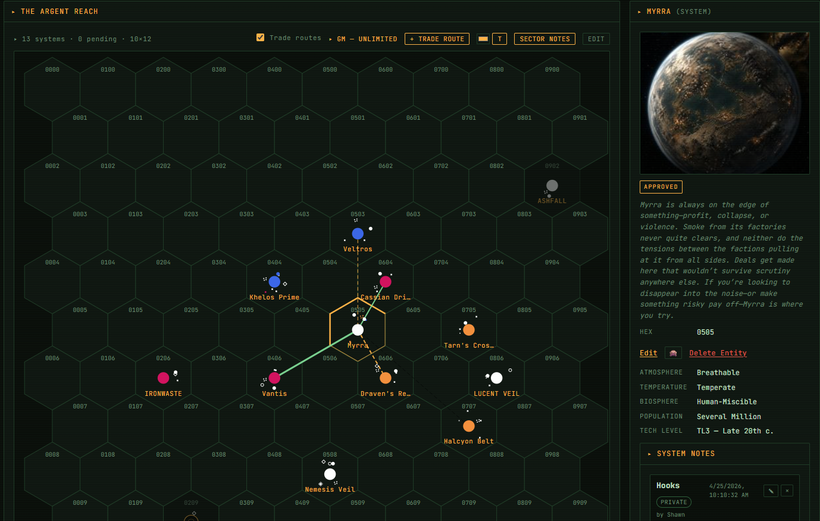
The sector map is the heart of the Stars Without Number VTT. Here's a tour.
Generating a Sector
From a new campaign, click "Generate Sector." The VTT uses the SWN sector generation tables (stars, worlds, tags, points of interest) to build a starter sector. You'll get: - 20-30 worlds arranged on a hex grid - Each world with tags, population, and basic details - A handful of seeded adventure hooks
You can use the generated sector as-is, or use it as a starting point and customize from there. Everything is editable.
Navigating the Map
Click and drag to pan. Scroll to zoom. Click any world to open its detail panel.
The minimap in the bottom right shows your current viewport position relative to the full sector. Click it to jump to any region of the map quickly.
Adding Worlds
Click any empty hex and select "Add World" to create a new system. Fill in the details manually or use the generator button to randomize a world on the spot.
Factions on the Map
The faction overlay (toggle from the sidebar) shows faction presence on each world. Faction assets are represented by small icons on their assigned world. This gives you a campaign-status view that updates automatically as you run faction turns.
Travel Time Calculator
Click any two worlds to see the spike drive travel time between them (based on hex distance and drive rating). Useful for answering "can we get there before the Mandate fleet does?"
Ship Positions
Add your party's ship to the campaign and assign it a current world. The ship icon appears on the map and moves when you update its position. Players can see where they are relative to everything else in the sector.