The Sector Map Is Your Campaign Hub
The Sector Map Is Your Campaign Hub
The sector map in the SWN VTT isn't just a visual aid — it's the operational center of your campaign. Here's how to use it like one.
The Map Is Live
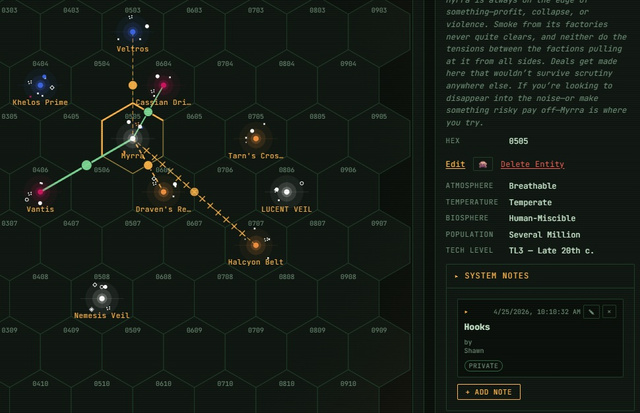
Unlike a static image, the sector map updates in real time. When faction assets move between worlds, the map reflects it. When PCs travel, their ship position updates. When a world's tags change from play, you update them inline.
World Details
Click any world on the map to open its detail panel: - World tags (two, per SWN rules) - Population, tech level, atmosphere, biosphere, temperature - Points of interest (you define these — cities, ruins, stations) - Current faction presence - Active adventure hooks you've noted
You can edit any of this mid-session. If the players discover something unexpected and you want to lock it in permanently, update the world right there.
Travel Routes
Draw travel routes between worlds to represent known spacelane connections, faction patrol paths, or common merchant routes. Routes show travel time in spike drive days based on the hex distance.
The Faction Overlay Toggle the faction overlay from the sidebar to see which factions control which worlds. Color-coded by faction, it gives you a campaign status view at a glance. Use this before each session to remind yourself of the political landscape.
Session Continuity The sector map saves automatically after every change. When players return for the next session, everything is exactly where they left it — faction positions, explored worlds, established routes, and your notes.
One tip: keep adventure hooks in the Points of Interest field per world, not in a separate document. That way when the players surprise you by jumping to a world you hadn't planned to visit, your notes are already in the panel.