A Guide to the SWN VTT Comms System
A Guide to the SWN VTT Comms System
The Comms System is one of the most immersive parts of the Stars Without Number VTT. Here's how to use it.
The Basics
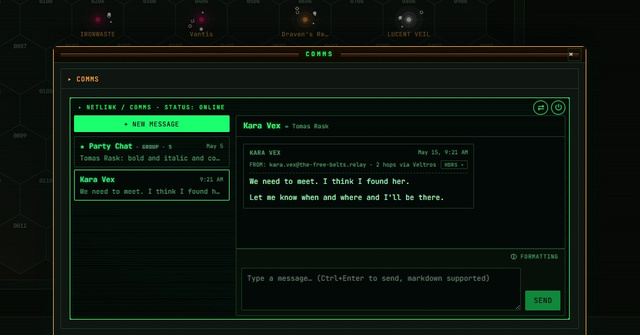
The Comms panel (accessible from the top nav in any session) handles all ship-to-ship and ship-to-station communication. Messages sent through the system appear in the public comms feed that all players can see.
Sending a Message
Open the Comms panel and click Compose. You can send: - Direct: a message visible only to the recipient ship/station - Broadcast: a general hail visible to all ships in the same system - Encrypted: a message that shows as "ENCRYPTED TRANSMISSION" to anyone who intercepts it (only the recipient sees the decrypted text)
Message Interception
Any ship with a Comms rating can intercept broadcasts and unencrypted direct messages between other ships in the same system. Open the Intercept tab and select "Monitor Traffic" to start passively reading all non-encrypted comms.
Intercepting encrypted messages requires a successful Tech/Comms check against the sender's encryption level. The VTT handles the roll — you just see the outcome.
Composing as an NPC
GMs can compose messages from any NPC ship or station in the system. Open Compose, click the "From" dropdown, and select any NPC contact you've added to the session roster. The message appears in the feed as coming from that NPC, complete with their ship name and designation.
This lets you run distress calls, bounty hunter hails, corporate directives, and sector news feeds — all from inside the comms interface.
Range Limits
The Comms System enforces FTL communication range. Ships in the same system can always communicate. Ships in adjacent systems can communicate if both have sufficient comms range. The FTL range overlay (toggle it from any contact's system profile) shows coverage visually on the sector map.
Signal Delay
FTL comms in SWN are instantaneous within range but don't propagate across the sector in real time. If you want to model light-speed delay for dramatic purposes (messages from the edge of the sector taking hours), the GM can add a "delayed" tag to outgoing messages and deliver them manually on a timer. We're adding native delay scheduling in a future update.